

You spent weeks finding the right person. They accepted the offer, gave notice, and showed up ready to work. Then they spent their first morning waiting for a laptop, a login, or a password reset.
It is a frustrating way to start a new job, and it is almost always avoidable. The fix is not complicated. It is a simple, repeatable IT onboarding checklist that your team follows every time someone new joins.
Key Takeaways
- An IT onboarding checklist turns a new hire’s first day from waiting on logins into real work.
- Most of the work happens before day one: accounts, equipment, software, and access should be ready when the employee walks in.
- Give every new employee only the access their role needs, and turn on multi-factor authentication from the start.
- Security training belongs in the first week, not months later.
- A managed IT provider can run the whole IT onboarding process for you, so nothing depends on someone remembering every step.
In this post, we walk through what belongs on that checklist, broken into what to do before day one, on day one, and during the first week. We also cover the security steps that are easy to skip and the common mistakes we see small businesses make when bringing new people onto their systems.
Why IT Onboarding Matters for Small Businesses
A new employee’s first few days set the tone for how they see your company. When their computer is ready, their email works, and they can open the files they need, they get the message that your business is organized and that their time matters. When none of that is ready, they get the opposite message.
There is also a cost. Every hour a new hire spends waiting on IT is an hour you are paying for with nothing to show for it. And it is rarely just the new hire’s time. A manager stops what they are doing to help, someone hunts down a spare laptop, and an office manager tries to remember the admin password for a system they rarely touch.
Security is the part that gets overlooked. Onboarding is when new accounts are created and new permissions are granted. If that happens in a rush, it is easy to give someone more access than they need, reuse a weak password, or forget to turn on multi-factor authentication. Those shortcuts tend to stick around long after the first week.
A written IT onboarding process solves all three problems. It makes the first day smoother, it protects the time of everyone around the new hire, and it makes sure security is built in from the start rather than added later.
The IT Onboarding Checklist
The best IT onboarding checklists are organized by timing. Most of the work should be finished before the employee arrives, so day one is about getting comfortable rather than getting set up.
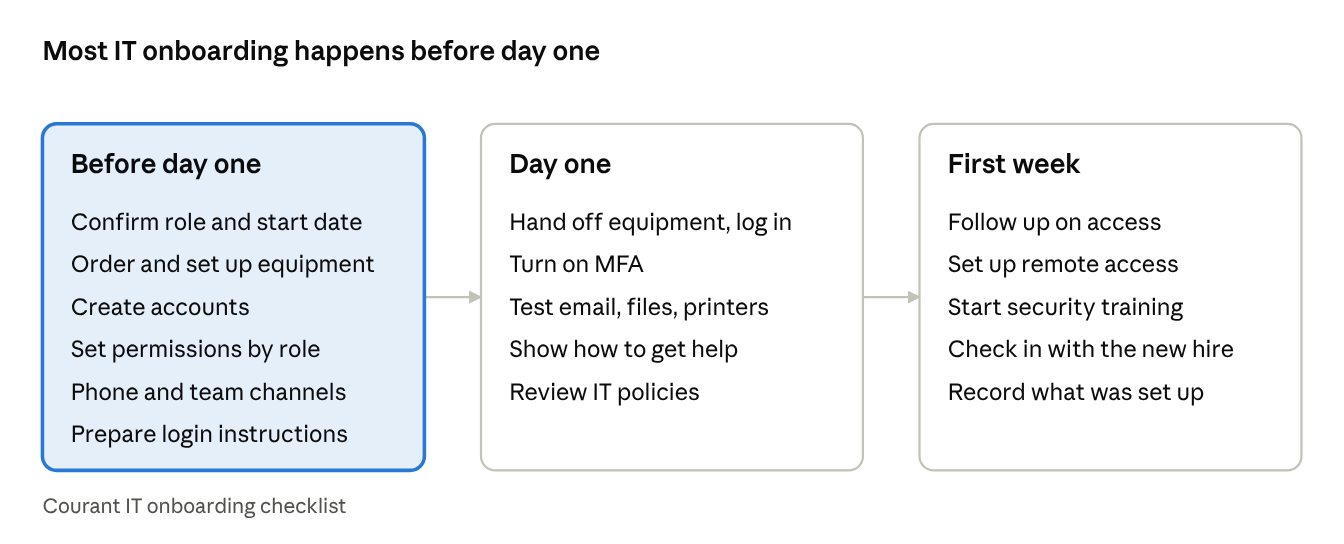
Before Day One
Start as soon as the offer is accepted. The more lead time IT has, the less likely it is that something will be missing on the first morning.
- Confirm the role and start date with IT. Share the new hire’s name, title, department, manager, and start date, plus whether they will work in the office, remotely, or both.
- Order or assign equipment. Decide what the person needs, such as a laptop or desktop, monitors, a headset, and a phone. If you are ordering new hardware, allow time for shipping.
- Set up the computer. Install the operating system updates, security software, and the standard business applications your team uses. Make sure the device is enrolled in whatever management and backup tools you rely on.
- Create accounts. This usually includes email, Microsoft 365 or Google Workspace, Teams or Slack, and any line-of-business software, such as accounting, practice management, or project management tools.
- Set permissions by role. Give access to the shared folders, applications, and systems the person needs for their job, and nothing more. This is easier when you have a standard access list for each role.
- Set up phone and communication tools. Assign an extension or number on your business phone system and add the person to the right distribution lists and team channels.
- Prepare login instructions. Create a temporary password that must be changed at first login, and plan how you will deliver it securely.
Day One
Day one should feel like a welcome, not a troubleshooting session. If the steps above are done, this part goes quickly.
- Hand off the equipment and walk through login. Have the employee sign in, set a new strong password, and confirm everything opens.
- Turn on multi-factor authentication. Set it up together, on their phone or an authenticator app, before they start working in email or shared files.
- Test the essentials. Check that email sends and receives, shared drives open, printers work, the phone rings, and any key applications launch.
- Show them how to get help. Make sure they know how to reach your IT help desk, whether that is a phone number, an email address, or a support portal.
- Review the basics of your IT policies. Cover acceptable use, where files should be saved, and how to handle company data. If your business has an AI use policy, this is a good time to go over it.
The First Week
The first week is for filling gaps and building good habits.
- Follow up on access requests. New hires often discover a folder or tool they need once they start real work. Handle those requests through your normal approval process rather than by sharing someone else’s login.
- Set up remote access if needed. If the person will work from home or travel, configure secure remote access and confirm it works from outside the office. Our post on hybrid workforce solutions covers this in more depth.
- Start security awareness training. Enroll the employee in your training program and make sure they know how to recognize and report a suspicious email.
- Check in. Ask the new hire and their manager if anything is missing or not working. Small issues are easier to fix in week one than in month three.
- Record what was set up. Keep a simple record of the equipment, accounts, and access the employee received. You will need it when their role changes or when they eventually leave.
Building Security Into the IT Onboarding Process
New employees are a natural target for scammers. They do not yet know who usually emails them, what normal requests look like, or which vendors your business works with. A message that claims to be from the owner or the accounting department can seem perfectly reasonable to someone in their first week.
That is why security steps belong on the IT onboarding checklist itself, not in a separate project for later. Three habits make the biggest difference.
Least privilege from the start. Give each new hire access to what their role requires and nothing extra. It is much easier to add access later than to discover that someone has had the keys to everything for a year. Standard access lists by role make this simple and consistent.
Multi-factor authentication on day one. Turning on multi-factor authentication during setup means the account is protected before it is ever used. Trying to add it later usually means chasing people down and fielding complaints.
Early training. A short session in the first week on how to spot phishing, how to handle sensitive data, and who to call when something looks off gives new employees the confidence to ask before they click. Our guides on how to spot a phishing email and building employee security training are good starting points.
If you want help putting these protections in place across your whole team, our cybersecurity services cover everything from threat monitoring to security awareness training.
Common IT Onboarding Mistakes to Avoid
Even businesses with good intentions run into the same few problems.
- Waiting until the first day to start. Equipment and accounts take time. Starting the IT onboarding process on the morning someone arrives almost guarantees a slow first day.
- Copying another employee’s access. It is tempting to give a new hire the same permissions as a coworker, but that coworker may have collected extra access over the years that the new person does not need.
- Sharing logins. Letting a new employee use someone else’s account to get by makes it impossible to know who did what, and it creates a security gap that is easy to forget about.
- Keeping the process in one person’s head. If only one person knows how to set up a new hire, onboarding stalls when that person is out sick or on vacation.
- Skipping the record. Without a list of what each employee was given, offboarding becomes guesswork, and accounts can stay active long after someone leaves.
How a Managed IT Provider Makes Onboarding Easier
For many small businesses, onboarding happens only a few times a year. That is just often enough to be disruptive and not often enough for anyone to get good at it.
A managed IT provider takes that work off your plate. At Courant, new employee setup is part of the day-to-day support our IT help desk provides. You tell us who is starting and when, and our team prepares the equipment, creates the accounts, sets the right permissions, and makes sure security protections are in place before the employee’s first day. When they arrive, a local technician who already knows your systems is a phone call away if anything comes up.
The same goes for the other end of the process. When someone leaves, we use the record from their onboarding to shut off access, recover equipment, and protect your data. A consistent process at both ends keeps your systems organized and your business protected as your team grows.
Frequently Asked Questions
What is an IT onboarding checklist?
An IT onboarding checklist is a step-by-step list of the technology tasks needed to get a new employee ready to work. It covers equipment, accounts, software, permissions, security settings, and training, organized by what happens before the first day, on the first day, and during the first week.
How far in advance should IT onboarding start?
As soon as the offer is accepted. Ordering equipment, creating accounts, and setting permissions all take time, and starting early gives you room to fix anything that goes wrong before the new hire arrives.
Who should be responsible for IT onboarding?
IT onboarding works best as a shared process. The hiring manager or HR provides the details about the role and start date, and your IT team or managed IT provider handles the equipment, accounts, access, and security setup.
What is the difference between IT onboarding and employee onboarding?
Employee onboarding covers the whole experience of joining a company, including paperwork, benefits, and introductions. IT onboarding is the part focused on technology: making sure the new hire has working equipment, the right accounts and access, and the security protections they need.
Should new employees get multi-factor authentication on day one?
Yes. Setting up multi-factor authentication during onboarding protects the account from the very first login. It is much harder to add it later once people are used to signing in without it.
Can a managed IT provider handle onboarding for my business?
Yes. A managed IT provider like Courant can prepare equipment, set up accounts and permissions, configure security, and support new employees through their first days, so your team does not have to manage the IT onboarding process on its own.
Give Every New Hire a Better First Day
A new employee’s first day should be about meeting the team and learning the job, not waiting on a login. With a clear IT onboarding checklist and the right partner behind it, every new hire can start ready to work, with the right access and the security protections your business needs.
If onboarding at your company still depends on someone remembering every step, we can help. Schedule a 15-minute consultation to talk through how Courant can take new employee setup off your plate, or contact our team and we will follow up to learn how your business brings new people on board.
Image created with Gemini Nano Banana.
Related reading: Technology Tips for Local Businesses Part 1



