

When it comes to streamlining operations and reducing costs, two terms get thrown around almost interchangeably: workflow automation vs. AI. But they’re not the same thing. And understanding the difference could save your business from investing in the wrong tool at the wrong time.
If your team is drowning in repetitive tasks, you need clarity. Do you need traditional workflow automation to handle structured, rule-based work? Or do you need AI to make intelligent decisions and adapt in real time? Or, as many successful businesses discover, do you need both?
This guide walks you through what each approach does, the distinct advantages of each, real-world examples, implementation considerations, and how to decide which investment makes sense for your firm right now. This guidance draws on Courant’s experience helping small and mid-sized businesses across New Orleans and the Gulf Coast navigate these exact decisions.
Key Takeaways
Which Tool Is Right for You?
Is your process repetitive, high-volume, and rule-based?
YES
Does it follow a clear if-then logic with very few exceptions?
YES
Start with Workflow Automation
Use tools like Zapier, Power Automate, or Make to handle this process now.
NO (many exceptions)
Consider AI-Enhanced Automation
Start with workflow automation for the routine path, then layer in AI to handle exceptions intelligently.
NO
Does it involve unstructured data (emails, documents, images) or require judgment?
YES
Invest in AI
This is where AI shines. Look at intelligent document processing, sentiment analysis, or predictive tools.
NOT SURE
Start with a Process Audit
Courant can help you map your processes and identify the right starting point before you invest in any tool.
Not sure where your process falls? Courant offers free process audits for small and mid-sized businesses.
What Is Workflow Automation?
Workflow automation uses rule-based logic to handle structured, repetitive tasks. Think of it as following a predetermined checklist: if this happens, do that. No thinking required, no learning involved.
Workflow automation tools move data between systems, fill out forms, route documents, send notifications, and trigger actions based on simple conditions. Examples include platforms like Microsoft Power Automate, Zapier, Make, and others designed specifically for business process automation.
Common workflow automation examples include:
- Invoice processing: Extracting data from invoices, matching them to purchase orders, and routing them for approval
- Lead routing: Automatically assigning new sales leads to account executives based on territory or skill set
- Onboarding workflows: Creating user accounts, provisioning software access, sending welcome emails
- Customer service ticketing: Sorting support requests and assigning them to the right department
- Document filing: Organizing records and filing them in the correct systems
The strength of workflow automation is consistency and speed. Once you define the rules, the system executes them perfectly, every time. It eliminates human error in routine tasks and frees your team to focus on work that requires judgment.
The limitation is rigidity. Workflow automation can’t adapt when things don’t match the script. If an invoice format changes slightly, or a lead doesn’t fit neatly into one territory, or an exception arises, the automation often stalls.
What Is AI?
AI, in the context of business automation, goes beyond following rules. AI systems learn patterns from data, make intelligent decisions, and adapt based on new information. They handle unstructured inputs like emails, documents, images, and conversations, and they improve over time.
AI-powered automation can recognize context, make predictions, and handle exceptions that a rule-based system would miss. Instead of asking “Does this match my predefined rule?” AI asks “What does this look like based on what I’ve learned?” This is the core distinction when evaluating workflow automation vs. AI for your business.
Practical examples of AI in business include:
- Predictive maintenance: Analyzing equipment data to predict when failures will occur before they happen
- Fraud detection: Identifying suspicious patterns in transactions that don’t fit normal behavior
- Intelligent document classification: Sorting documents by type, extracting key information, and routing based on content
- Chatbots with real understanding: Interpreting customer intent, even when phrased multiple ways, and routing to the right resource
- Sentiment analysis: Reading the tone of a customer email and prioritizing urgent issues first
- Personalized recommendations: Learning customer preferences and suggesting next steps
The strength of AI is flexibility and learning. It adapts to variations, improves with more data, and scales intelligently. The trade-off is complexity and the need for good data to train on. AI implementation requires more upfront planning and preparation than typical workflow automation.
The Spectrum: From Routine Workflow Automation to Intelligent AI Decision-Making
One of the most useful ways to understand workflow automation vs. AI is to think of them not as two separate buckets, but as points on a spectrum of increasing intelligence and autonomy. The infographic below maps out this spectrum across five levels:
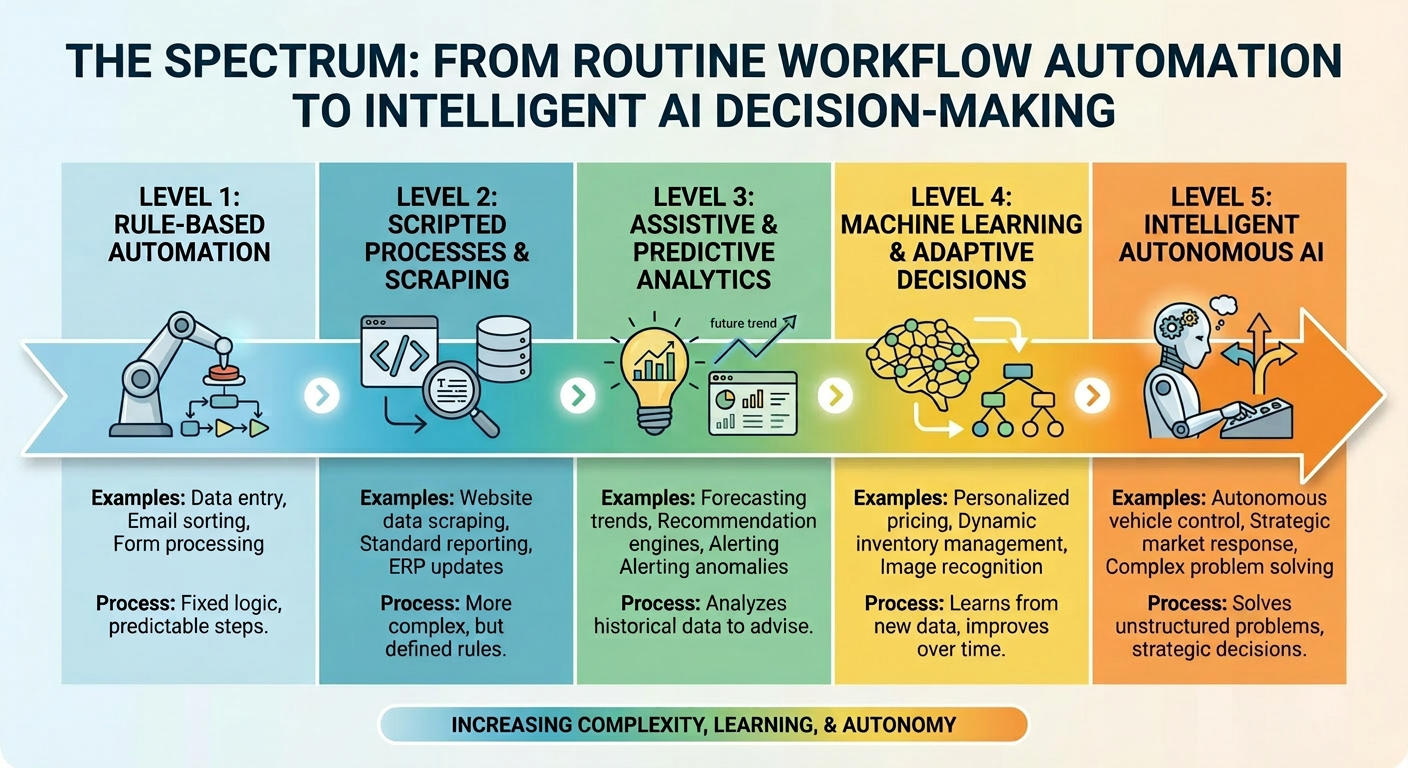
Most small and mid-sized businesses today operate at Levels 1 and 2 — rule-based automation and scripted processes. The opportunity lies in deliberately moving up the spectrum, adding AI capabilities where they deliver the highest business value.
How Workflow Automation vs. AI Compare Across Key Dimensions
The best way to understand workflow automation vs. AI is to look at how they stack up on what matters most to your business. The table below gives you a clear side-by-side view:
Which Tool Fits Your Process? A Quick Visual Guide
Plot your process by volume and complexity to find where it falls.
High volume, low complexity
Invoice processing, lead routing, onboarding workflows, ticket sorting
High volume, high complexity
Fraud detection, document classification, customer sentiment analysis, predictive maintenance
Low volume, low complexity
Low-frequency tasks that are easy to do manually. Automation may not yet justify the setup cost.
Low volume, high complexity
Strategic decisions, unusual edge cases, relationship-sensitive issues. Consider targeted AI or keep human-led.
VOLUME (High to Low)
TASK COMPLEXITY (Low to High)
Not sure which quadrant your process falls in? Courant can map it for you in a free process review.
Speed and Implementation
Workflow automation wins on speed. You can build a workflow in days or weeks, and many organizations see results relatively quickly once the system is running.
AI takes longer to implement because it requires data preparation, model training, and testing. Expect a longer lead time before you see results. But once AI is in place, decisions happen in real time with increasing accuracy over time.
Scope and Complexity
Workflow automation handles straightforward, structured processes where the rules are clear and consistent. You build rules, the system follows them, and exceptions are minimal.
AI handles messier, more variable work. The more complex and varied the task, the more valuable AI becomes. But that complexity requires more setup and more data to work effectively.
Scalability
Workflow automation scales up to a point. You can automate more processes, but each one requires its own set of rules. Growth is incremental and requires manual configuration for each new process.
AI scales intelligently. One AI system can handle variations and exceptions across thousands of cases without additional configuration. As your business grows, AI capability grows with it without rebuilding the system.
Handling Exceptions
Workflow automation excels at processes where most cases follow the same path. The more exceptions and variations, the harder it becomes to maintain.
AI thrives on variation and exceptions. It learns from edge cases and improves over time. Processes with frequent exceptions are actually strong candidates for AI.
When to Choose Workflow Automation
Choose workflow automation when you have processes that are:
- Repetitive and high-volume (you’re doing the same task hundreds or thousands of times)
- Rule-based and structured (clear if-then logic)
- Well-documented and standardized
- Low exception rate (most cases follow the same path)
- Clear business value (the time saved justifies the effort to automate)
Smart moves for workflow automation include automating invoice processing, lead routing, customer onboarding workflows, and routine customer support ticket handling. These are the workhorse automations that keep operations running smoothly and predictably.
If your team spends significant time on repetitive, structured work, workflow automation is your starting point. It’s straightforward, proven, and delivers visible impact relatively quickly.
When to Choose AI
Choose AI when you face processes that are:
- Unstructured or variable (emails, documents, images, conversations with many possible inputs)
- Requiring judgment or context (evaluating which decision is best, not just following a rule)
- Complex with many exceptions (you need to handle edge cases intelligently, not just flag them)
- Benefiting from prediction or pattern recognition (forecasting, anomaly detection, risk scoring)
- Needing to improve over time (you want the system smarter six months from now than it is today)
Strong AI candidates include fraud detection, predictive maintenance, intelligent document processing, customer sentiment analysis, and personalized recommendations. These use cases generate value from understanding context and learning patterns.
If your business faces problems that a simple rule can’t solve, AI is the tool. Yes, it requires more planning and takes longer to implement. But the capability and adaptability make it worth the investment for the right
Which Tool Is Right for You?
Is your process repetitive, high-volume, and rule-based?
YES
Does it follow a clear if-then logic with very few exceptions?
YES
Start with Workflow Automation
Use tools like Zapier, Power Automate, or Make to handle this process now.
NO (many exceptions)
Consider AI-Enhanced Automation
Start with workflow automation for the routine path, then layer in AI to handle exceptions intelligently.
NO
Does it involve unstructured data (emails, documents, images) or require judgment?
YES
Invest in AI
This is where AI shines. Look at intelligent document processing, sentiment analysis, or predictive tools.
NOT SURE
Start with a Process Audit
Courant can help you map your processes and identify the right starting point before you invest in any tool.
Not sure where your process falls? Courant offers free process audits for small and mid-sized businesses.
How Workflow Automation and AI Work Together
The most successful businesses don’t treat workflow automation vs. AI as an either/or decision. They layer AI on top of workflow automation to create systems that are both efficient and intelligent.
Here’s how it works in practice:
The Hybrid Architecture: How Automation and AI Layer Together
Every business process can be broken into three zones. The goal is to automate as much as possible and let humans focus on what truly requires judgment.
Courant helps businesses design hybrid systems that automate the right work at each layer. Most clients reduce manual processing time significantly within the first 90 days.
Example: Invoice Processing Workflow
A business uses workflow automation to handle the structured part of invoice processing. The system extracts data from invoices, matches them to purchase orders, and routes them to the right approval level based on amount.
Where workflow automation reaches its limit, AI takes over. The AI system detects exceptions that don’t match normal patterns, flags potential duplicates or fraud, and identifies invoices that need human review. It learns from past exceptions and improves its detection over time.
Result: The team processes a significant portion of invoices completely automatically. The remaining cases get intelligent flagging and human review. Processing time improves, and the process becomes more reliable over time.
Example: Customer Service
Basic workflow automation routes support tickets to the right department based on category. AI adds a layer of intelligence. It reads the customer’s message, interprets their intent, analyzes sentiment, and escalates urgent or complex issues immediately.
Over time, AI learns which customers are likely to churn, which issues are likely to be resolved quickly, and which need escalation. The result is faster resolution, fewer escalations, and better customer retention.
This hybrid approach is why many forward-thinking organizations deploy hybrid automation architectures. They get the efficiency of workflow automation with the adaptability and learning of AI.
Building Your Roadmap
If you’re ready to reduce manual work and improve efficiency, here’s how to think about your roadmap when it comes to workflow automation vs. AI investments:
Your Automation Roadmap: 4 Phases to a Smarter Operation
Most businesses complete Phase 1 and 2 within 60 to 90 days. Phases 3 and 4 build on that foundation.
Audit and Prioritize
Map your processes. Identify which are high-volume and rule-based (automation) vs. complex and judgment-driven (AI).
Timeline: Week 1 to 2
Start Small with Automation
Pick one or two high-impact, rule-based processes. Implement, measure results, and prove the business case before expanding.
Timeline: Week 2 to 8
Layer in AI
Add AI where it adds value: intelligent exception handling, predictive capabilities, or smarter decision-making at key points.
Timeline: Month 2 to 4
Build Your Hybrid Engine
Automation handles routine work. AI manages complexity. Humans focus on high-value judgment. Competitive advantage emerges.
Timeline: Month 4 and beyond
Courant guides businesses through every phase of this roadmap. Contact us to start your process audit.
Phase 1: Audit and Prioritize
Document your current processes. Which ones are high-volume, repetitive, and rule-based? Those are your workflow automation candidates. Which require judgment, context, or handle unstructured data? Those are your AI candidates.
Prioritize by business impact. Which automation addresses your biggest operational pain point? Start there.
Phase 2: Start Small with Workflow Automation
Pick one or two automation projects that address clear business needs. Invoice processing or lead routing are good starting points. Keep the scope narrow, implement thoughtfully, measure results, and prove the business case before scaling.
Many organizations find that starting with workflow automation helps build internal understanding of automation principles, which makes it easier to evaluate AI opportunities later.
Phase 3: Layer in AI Where It Adds Value
Once you have one or two successful automation projects running, identify where AI would increase their impact. Can you add intelligent exception handling? Predictive capabilities? Better decision-making at key points?
Start with a pilot AI project that complements your existing automation. Keep expectations realistic about implementation timeline, but understand that the intelligence and adaptability AI brings can transform how you handle complex problems.
Phase 4: Build Your Hybrid Engine
As both automation and AI mature, you’ll have a hybrid system that handles routine work predictably and intelligently while flagging exceptions for human review. This is where the real competitive advantage emerges.
Most businesses need some of both, and the useful question is which problems belong in which column. Our AI enablement services cover the AI side, and our managed IT services in New Orleans handle the plumbing that automation depends on, which is usually where these projects actually stall. Schedule a 15-minute consultation to map your own list, or contact our New Orleans team.
Frequently Asked Questions: Workflow Automation vs. AI
What is the main difference between workflow automation and AI?
Workflow automation follows fixed, predefined rules to execute structured, repetitive tasks, like routing invoices or sending onboarding emails. AI goes further: it learns from data, handles unstructured inputs, makes judgment-based decisions, and improves over time. The core difference in the workflow automation vs. AI debate is rules vs. learning.
Can a small business afford AI?
Yes, more so than ever. Many AI capabilities are now embedded in tools small businesses already use (Microsoft 365 Copilot, HubSpot AI, QuickBooks AI categorization). You don’t need a data science team to start. The key is starting with targeted, high-value use cases rather than broad enterprise AI deployments.
Should I start with workflow automation or AI?
Start with workflow automation. It’s faster to implement, cheaper to start, and builds the operational foundation that makes AI more effective later. Most businesses that succeed with AI got there by first mastering workflow automation for their structured, high-volume processes.
What are the best workflow automation tools?
The most widely used workflow automation platforms for small and mid-sized businesses include Microsoft Power Automate, Zapier, Make (formerly Integromat), and Monday.com. The right choice depends on your existing software stack and the processes you’re automating.
How long does it take to implement AI vs. workflow automation?
Workflow automation projects typically go live in days to a few weeks. AI implementations range from several weeks to several months, depending on data readiness, complexity, and integration requirements. Plan for a longer runway with AI, but the payoff in adaptability and intelligence is significant.
Is RPA the same as workflow automation?
Robotic Process Automation (RPA) is a subset of workflow automation that uses software bots to mimic human interactions with applications: clicking, typing, copying data. Traditional workflow automation is broader and often connects systems via APIs rather than screen-level interaction. Both fall on the automation side of the workflow automation vs. AI spectrum.
Getting Started
Workflow automation vs. AI isn’t really a versus at all. It’s about matching the right tool to the right problem, implementing them in a logical sequence, and building systems that get smarter over time.
The businesses winning today are the ones that started with workflow automation to handle routine, structured work, then layered in AI to tackle complexity and learn from their operations. If your team is still manually handling high-volume, repetitive tasks, that’s your starting point.
The good news is you don’t have to solve everything at once. Start with one workflow automation project, measure the results, build momentum, and then think strategically about where AI adds the most value.
If you’d like help auditing your current processes and identifying your best automation opportunities, Courant is here to walk through it with you. As a managed services provider working with small and mid-sized businesses, we help clients cut through the noise and build automation roadmaps that deliver real results without the hype or oversell. Contact Courant today and you’ll speak directly with someone who can translate your business challenges into a practical strategy.
The image at the top of this post was created using Nano Banana. Generative AI tools like this are just one example of how AI is becoming more accessible to everyday businesses. Curious how AI fits into your operations? It’s one of the first questions our team at Courant explores with new clients.



