Key Takeaways
- Nonprofits often run lean, so a single gap in IT support or security can slow programs and fundraising.
- In a 2026 UC Berkeley study of 100 Washington State nonprofits, 79% reported at least one cyberattack in the previous three years.
- A 2025 Chronicle of Philanthropy survey found most nonprofits spend less than 3 percent of their budgets on technology.
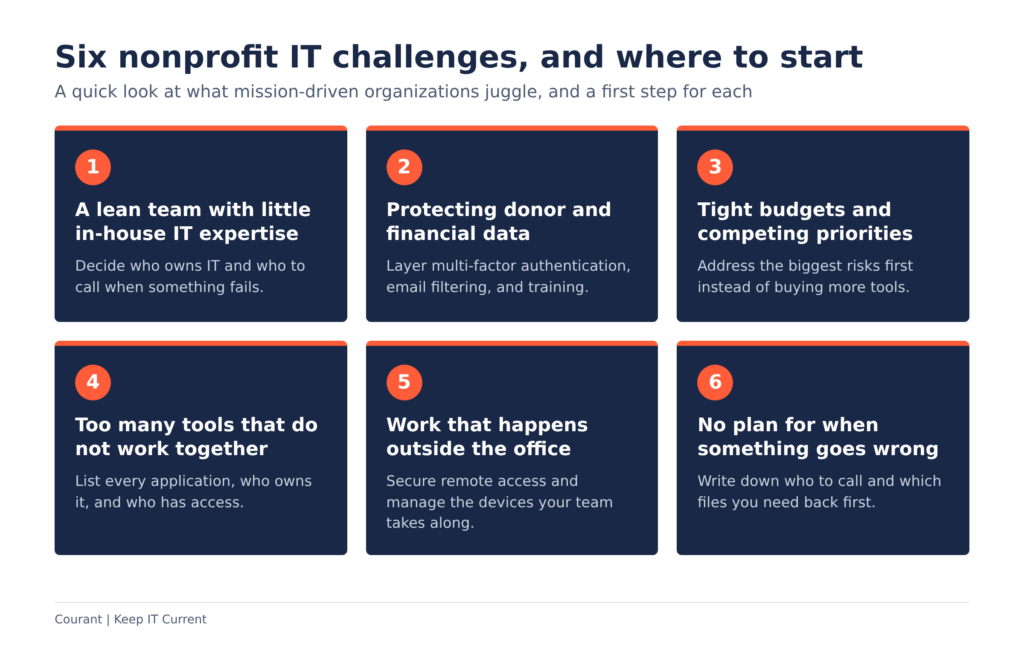
- Six common challenges: thin IT staffing, donor data protection, tight budgets, disconnected tools, work outside the office, and no plan for when something goes wrong.
- A layered approach (security basics, reliable backups, organized tools, and a written plan) closes most of these gaps.
Nonprofit IT challenges tend to stay in the background until something breaks or someone clicks the wrong link. Then they become the only thing anyone can think about. For executive directors, board members, and operations managers, the frustration is understandable. You are focused on the mission, yet the technology behind that mission depends on a small team, a careful budget, and a long list of tools that all need to work together.
The good news is that these challenges are familiar, and most are manageable once you know what to look for. In this post, we walk through six common nonprofit IT challenges facing mission-driven organizations, share what recent research says about them, and outline practical steps you can take. Whether you manage IT yourself, lean on a volunteer, or already work with a provider, you will find ideas you can put to use.
Why Nonprofit IT Challenges Look Different From Other Organizations
A nonprofit has the same technology needs as any other organization: email, file storage, phones, security, and reliable devices. What differs is the context. Budgets are watched closely, teams are small, and the information you hold, from donor records to details about the people you serve, carries a lot of trust.
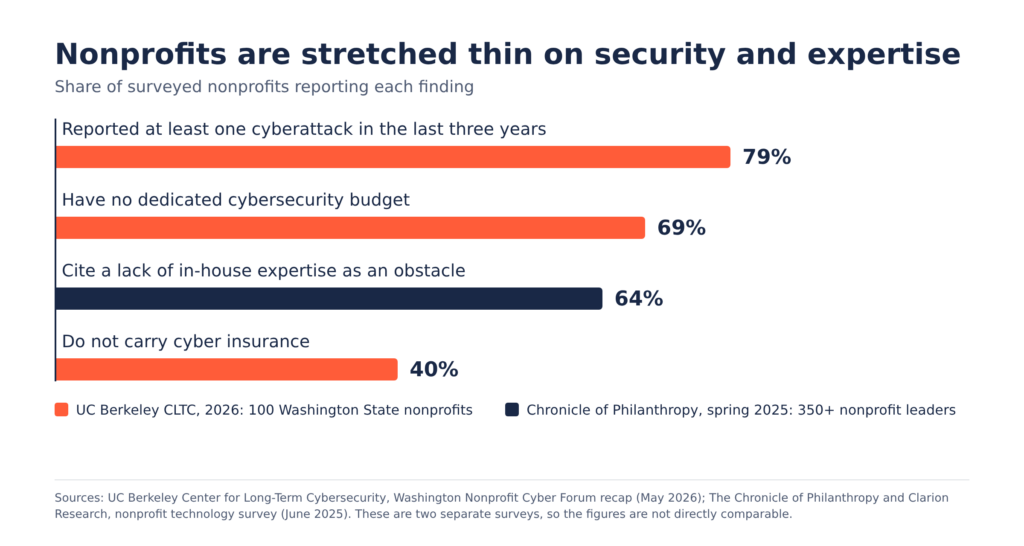
Two recent studies put numbers on this. In a study published in 2026 by the UC Berkeley Center for Long-Term Cybersecurity, which surveyed 100 nonprofits across Washington State, 79% reported at least one cyberattack in the last three years. The same study found an average of one IT staff member for every 162 staff and volunteers, and 69% of the organizations had no dedicated cybersecurity budget.
The second study comes from The Chronicle of Philanthropy. Its spring 2025 survey of more than 350 nonprofit leaders, conducted by Clarion Research, found that nearly 9 in 10 leaders say technology is vital to their fundraising success, yet most spend less than 3 percent of their budgets on it. Sixty-four percent pointed to a lack of in-house expertise as an obstacle.
The Berkeley study covers Washington State, so it will not mirror every organization. Still, the pattern behind many nonprofit IT challenges is worth noticing: technology matters more than ever, and the people and budget behind it are often stretched thin.
Challenge 1: A Lean Team With Little In-House IT Expertise
In many nonprofits, IT is one more job added to someone’s plate alongside their actual role. That works until the technology grows more complex than one person can reasonably cover, or until that person is out sick or moves on.
The fix starts with clarity about who owns what. Write down which systems you rely on, who has administrator access, and who to call when something fails. From there, many organizations find it makes sense to hand day-to-day support, monitoring, and updates to an outside team so staff can stay focused on programs.
Challenge 2: Protecting Donor and Financial Data
Donor lists, payment details, volunteer records, and information about the people you serve all need protection. A single compromised email account can be used to send convincing messages to your supporters, and ransomware can lock up the files your team needs to run programs.
Basic antivirus is no longer enough on its own. A layered approach usually includes:
- Multi-factor authentication on email and other key accounts.
- Email filtering to catch phishing messages before they reach your inbox.
- Security awareness training so staff and volunteers can spot suspicious messages.
- Access controls that limit who can see sensitive records.
- Dark web monitoring to flag exposed credentials.
- Backups that you can restore if something goes wrong.
None of these requires a large team. They do require someone to set them up, keep them current, and watch for alerts.
Challenge 3: Tight Budgets and Competing Priorities
Every dollar a nonprofit spends on technology is a dollar not spent directly on programs, and that tension is real. In the Chronicle survey, nearly 9 in 10 leaders named budget constraints as their primary obstacle. In the Berkeley study, 69% of organizations had no dedicated cybersecurity budget.
When money is tight, the answer is rarely to buy more tools. It is to decide which risks matter most and address those first. Protecting email, securing devices, and keeping reliable backups tend to deliver the most protection for the effort. Planning ahead also helps you avoid emergency fixes, which are often the most disruptive way to spend a technology budget.
Challenge 4: Too Many Tools That Do Not Work Together
Over time, most organizations collect separate applications for fundraising, accounting, email, file sharing, and communication. Each one made sense when it was added. Together, they can mean duplicate data entry, unclear access to sensitive information, and extra work for a small team.
A useful exercise is to list every application your team uses, who owns it, who has access, and what it costs your time to maintain. You may find tools nobody uses, accounts that belong to people who have left, or two applications doing the same job. Managing your technology vendors in one place, and planning changes before they happen, keeps the pieces working together more smoothly.
Challenge 5: Work That Happens Outside the Office
Nonprofit work does not always happen at a desk. Staff and volunteers may be at events, in the community, or working from home, and each location is a place where devices and connections need protection.
Secure remote access and managed devices let your team reach the files and systems they need without leaving a gap in your security. Collaboration tools like Microsoft 365 and Microsoft Teams, along with a business phone system that works from anywhere, help everyone stay connected whether they are in the office or not. It also helps to have a clear process for onboarding new employees and offboarding departing ones, so accounts and devices are set up and shut down properly.
Challenge 6: No Plan for When Something Goes Wrong
Even well-protected organizations can have a bad day: a failed device, a lost file, or a compromised account. What matters is how quickly you can recover.
The Berkeley study points to a common gap here. In the recap of the study, researcher Shannon Pierson noted that about half of the surveyed organizations lack an incident response plan, nearly half lack a business continuity plan, and 40% do not carry cyber insurance.
A basic plan does not have to be long. It should answer a few questions:
- Who do we call first, and who makes decisions?
- Which systems and files do we need back first?
- Where are our backups, and who can restore them?
- Who needs to be told, such as staff, donors, or partners?
Having those answers written down before an incident makes a stressful situation far easier to manage.
Your Nonprofit IT Health Check
Use this quick checklist to see where your organization stands on these nonprofit IT challenges. Every unchecked box is a good topic for your next conversation with your team or your IT provider.
How a Managed IT Partner Helps With Nonprofit IT Challenges
Most of the nonprofit IT challenges above come down to the same thing: a small team asked to cover a very large technology footprint. A managed IT partner fills that gap with people, tools, and process, so your staff can stay focused on the mission.
At Courant, our IT services for nonprofits include 24/7 monitoring, help desk support for password resets, printers, and employee onboarding and offboarding, and vendor management so you have one team to call about your technology. On the security side, we provide multi-factor authentication, email filtering, security awareness training, dark web monitoring, and backups. We also offer business phone systems and Microsoft 365 support to keep teams connected wherever they work.
We are a New Orleans-based team serving organizations across Greater New Orleans, and when you call during business hours, a live, local person answers. We tailor our approach to your organization’s compliance requirements and goals rather than applying a one-size-fits-all package.
FAQs About Nonprofit IT Challenges
What are the biggest IT challenges for nonprofits?
The most common are thin IT staffing, protecting donor and financial data, tight budgets, disconnected tools, securing work done outside the office, and having no plan for recovering from an incident. Recent research from UC Berkeley (2026) and The Chronicle of Philanthropy (2025) points to limited expertise and limited budgets as recurring obstacles.
Why would cybercriminals target a nonprofit?
Cybercriminals look for organizations that hold valuable information and may have fewer defenses in place. A nonprofit’s donor lists, financial records, and email accounts fit that description. In the Berkeley study, 79% of the 100 Washington State nonprofits surveyed reported at least one cyberattack in the previous three years.
How much should a nonprofit spend on IT?
There is no single right number, because it depends on your size, your risks, and your goals. For context, the Chronicle survey found that most nonprofits spend less than 3 percent of their budgets on technology, and that those spending more than 3 percent were twice as likely to report using technology in advanced ways. A good first step is an honest look at your current risks and priorities.
Does a nonprofit need its own IT department?
Not necessarily. Many nonprofits are too small for a full in-house team. A managed IT provider can handle monitoring, help desk support, security, and backups, while someone on your staff stays involved to make decisions and set priorities.
Where should a nonprofit start with IT security?
Start with the basics: multi-factor authentication, email filtering, security awareness training, and reliable backups. Then write down a simple plan for what to do if something goes wrong. The checklist above is a good place to begin.
Take the Next Step on Your Nonprofit IT Challenges
If any of these nonprofit IT challenges sounded familiar, you do not have to solve them alone. Our team can walk through where your organization stands today and where a few changes would make the biggest difference.
Schedule a 15-minute consultation to talk through your nonprofit’s technology, or contact us with your questions. We would be glad to help you keep your technology working so you can keep your focus on the mission.