

Most businesses budget for the IT costs they can see: software licenses, hardware purchases, and a monthly bill from their managed service provider. But the expenses that quietly wreck budgets are the ones nobody planned for. Hidden IT costs hide inside contracts, downtime, security gaps, and the slow drift of “temporary” fixes that become permanent. This guide breaks down the most common hidden IT costs, why they happen, and exactly how to avoid them.
Key Takeaways
- Hidden IT costs are the unbudgeted expenses that surface later as downtime, security incidents, wasted subscriptions, and emergency repairs.
- The biggest culprits include unplanned downtime, cyberattacks, shadow IT, aging hardware, cloud sprawl, poor integrations, slow support, and vendor lock-in.
- Nearly all of these costs are preventable with regular audits, proactive maintenance, and a standardized, well-planned technology strategy.
- A predictable, flat-rate managed IT partnership turns unexpected budget surprises into a single, manageable line item.
What Are Hidden IT Costs?
Hidden IT costs are technology-related expenses that don’t appear on the surface of a budget or a vendor quote. They surface later as downtime, emergency repairs, wasted subscriptions, integration headaches, or the labor your team burns solving problems that better planning would have prevented. Because they’re spread across departments and rarely tracked in one place, they’re easy to underestimate, and they add up fast.
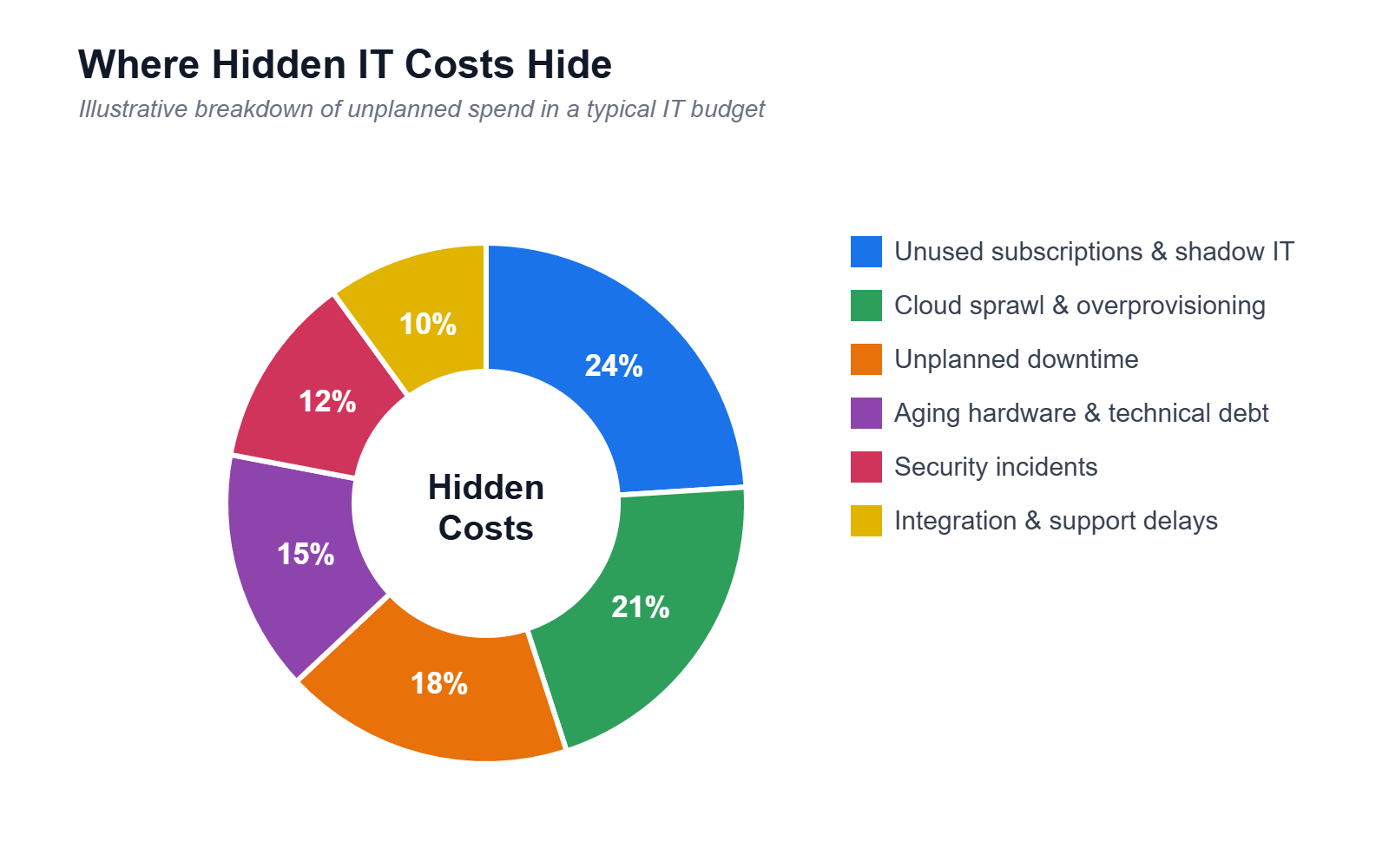
The 8 Most Common Hidden IT Costs
1. Unplanned Downtime
When systems go down, you don’t just lose the cost of the fix. You lose employee productivity, missed sales, and customer trust. A single hour of downtime can cost a small business thousands of dollars in lost revenue and idle payroll. The fix is proactive monitoring and a tested backup and recovery plan, so outages are measured in minutes rather than days.
2. Security Breaches and Ransomware
Cybersecurity incidents carry costs far beyond the ransom or remediation: legal fees, regulatory fines, notification costs, higher insurance premiums, and reputational damage. Many businesses discover their coverage gaps only after an attack. Preventive security, employee training, endpoint protection, and multi-factor authentication cost a fraction of a single breach.
3. Shadow IT and Unused Subscriptions
When employees sign up for their own apps and tools, costs multiply out of sight. Duplicate subscriptions, forgotten auto-renewals, and per-seat licenses for people who left months ago quietly drain the budget. Regular software audits and a central approval process for new tools can reclaim a surprising amount of wasted spend.
4. Aging Hardware and Technical Debt
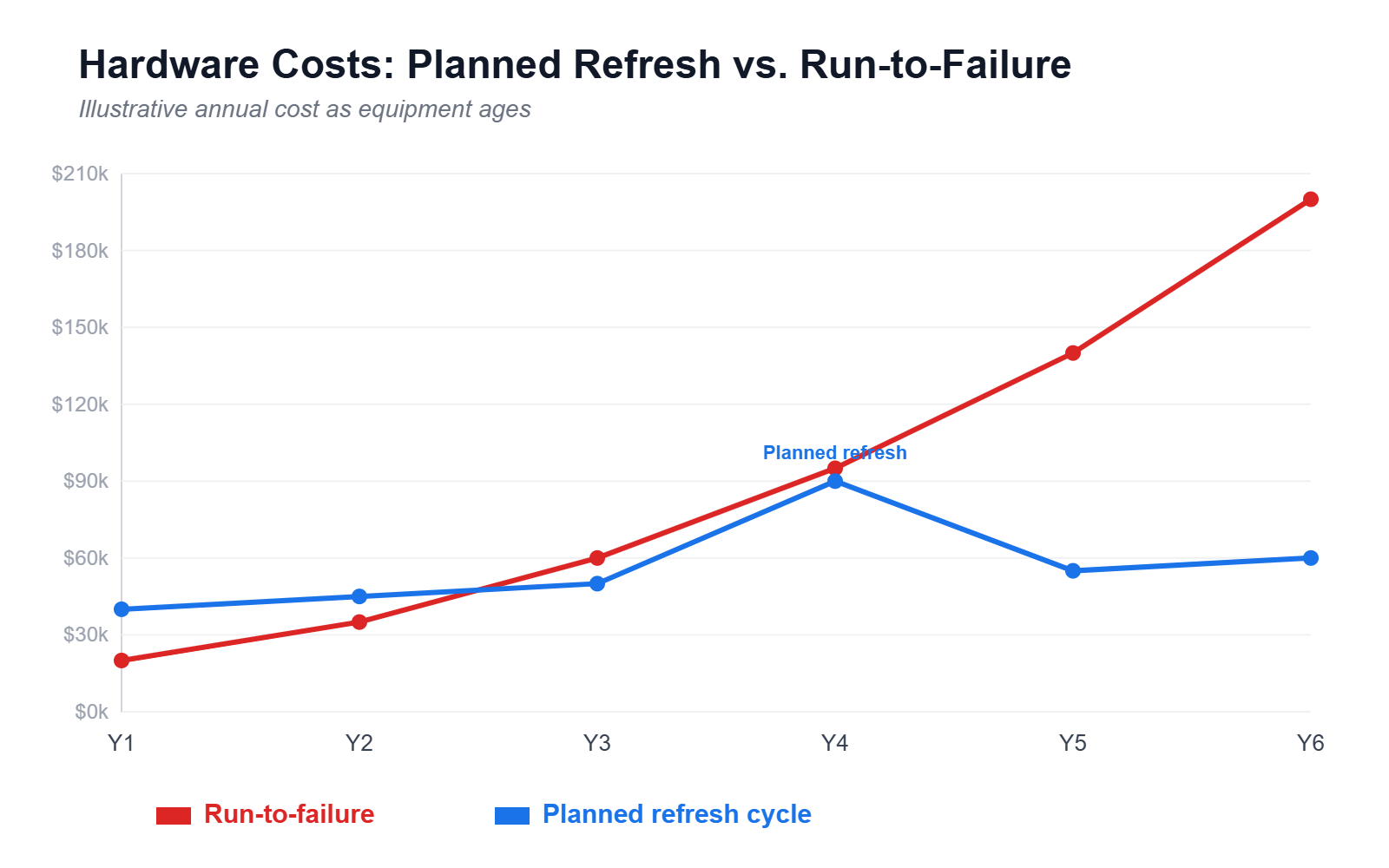
Holding onto old servers and computers feels like a saving, but outdated equipment fails more often, runs slower, and costs more to maintain. Technical debt, the accumulated cost of quick fixes and outdated systems, compounds until a forced emergency upgrade hits all at once. A planned hardware refresh cycle spreads the cost and prevents crisis spending.
5. Cloud Sprawl and Overprovisioning
Cloud services scale easily, which is exactly why bills balloon. Idle instances, oversized storage, forgotten test environments, and data egress fees add up every month. Right-sizing resources, setting budget alerts, and reviewing cloud usage quarterly keeps spending aligned with what you actually use.
6. Integration and Compatibility Issues
New software rarely works in isolation. When tools don’t integrate cleanly, you pay in custom development, middleware, and hours of manual data entry. Evaluating compatibility before you buy, and favoring platforms with strong native integrations, avoids expensive workarounds later.
7. Employee Downtime and Help Desk Delays
Slow support is a hidden payroll cost. Every hour an employee waits on a password reset or a frozen application is an hour of salary spent on nothing. Fast, responsive IT support and self-service resources keep your team productive and turn a hidden cost into recovered time.
8. Vendor Lock-In and Contract Traps
Attractive introductory pricing often hides steep renewal increases, early-termination penalties, and data-migration fees that make leaving expensive. Read contracts carefully, negotiate renewal caps, and confirm your data is portable before you commit. Flexibility is worth more than a small upfront discount.
How to Avoid Hidden IT Costs: A Practical Checklist
- Audit regularly. Review software licenses, cloud usage, and hardware inventory at least quarterly to catch waste early.
- Invest in prevention. Proactive monitoring, patching, and cybersecurity cost far less than emergency response.
- Standardize your tools. A curated, approved tech stack reduces shadow IT and integration problems.
- Plan hardware lifecycles. Budget for replacements on a schedule instead of waiting for failures.
- Read the fine print. Scrutinize renewal terms, egress fees, and exit clauses before signing.
- Track total cost of ownership. Factor in support, training, and maintenance, not just the sticker price.
- Partner with the right provider. A predictable, flat-rate managed IT model turns surprise costs into a fixed line item.
The Bottom Line
Hidden IT costs rarely announce themselves. They accumulate through downtime, wasted subscriptions, aging systems, and contracts nobody reread. The good news is that nearly all of them are preventable with regular audits, proactive maintenance, and a predictable managed IT partnership. When your technology spending is visible and planned, budget surprises disappear, and IT becomes an investment rather than a recurring headache.
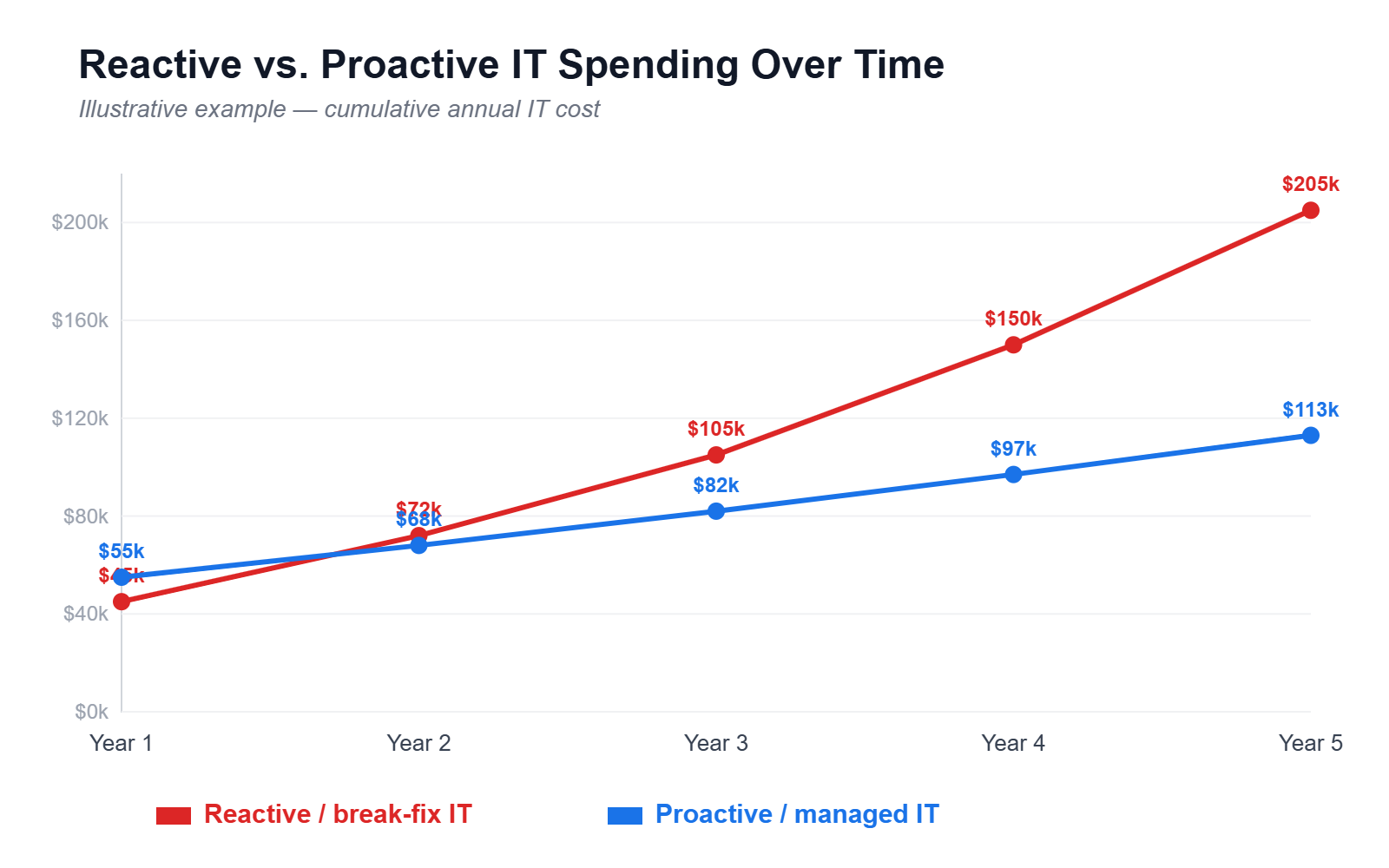
Ready to Eliminate Hidden IT Costs?
Let’s turn unpredictable IT expenses into a single, manageable line item. Our team will help you uncover the hidden costs draining your budget and build a proactive plan to prevent them.
How We Can Help
The costs in this post are hard to see precisely because they are scattered. An hour lost here, an emergency call-out there, a subscription nobody remembers approving. Individually none of them look like much. They only become visible when someone is tracking them in one place.
That tracking is a large part of what you are actually buying with managed IT. We inventory what you are paying for, consolidate the tools that overlap, and move you onto a predictable monthly cost so downtime, emergency labor and surprise renewals stop arriving as unplanned expenses. If you are not sure which of our services that involves, see how we help is the clearest place to start.
If you want a straight answer on what your current setup is really costing you, schedule a 15-minute consultation and we will go through it with you. You can also contact our New Orleans team with a specific question.



